Blender Addon · v1.0.0

RigBridge

Your animations break when you export them. Your weights have problems you can't see.

RigBridge ships a custom FBX exporter that handles the problems Blender's stock exporter doesn't. Your animations match what you see in the viewport no matter the game-engine. It also has a stress test that pushes every joint to its limit and paints your mesh where the weights tear. Rigify, Mixamo, custom rigs. Any engine.

UE5 · UE4Unreal Engine
Unity · Godot+ Custom FBX
Any RigRigify · Mixamo · Custom
$49One-time

Questions, updates, or just want to chat: @Kajin on X

Why I built this

I'm building a game in UE5 (first time ever). Rigify has always been my go-to for animation, so when I started importing into the engine, every animation broke in ways that never showed up in Blender (which confused me alot at first). Spine tearing, hierarchy mismatches, the mesh looking like liquid, deformation collapsing for no visible reason (many of these issues where happening when i tried different tools, settings). All of it export-only nothing visible in Blender.

I really got stubborn on it. I had already animated the main character (not far but my curiosity took over). I started doing research to then realize there is no "fix"? So I started getting desperate and tried every tool I could find, free and paid. They help transfer to a game rig, sure. But none of them fix the root cause, which is how Blender's FBX exporter writes bone transforms and how UE5 reads them back. Those are two different sets of math, and nobody was addressing the gap (Which no-one did).

I started debugging the entire export chain myself. First the game rig generation, which was the easy part. Then tracing every value that travels from Blender to UE5 and figuring out where it goes wrong. Bone matrix decomposition, scale inheritance flags, armature Null nodes, quaternion flips. One fix led to another. Step by step i found out every issue when exporting but it did take alot of effort.

After a while the tool got big enough that it stopped being a personal script and started looking like a product. I found the fixes I needed, and I figured someone else probably needs them too. I also started adding things I've always wanted Blender to have. Weight painting QA, stress testing, the diagnostics are part of the tools i used to debug, but i had many scripts also created. It turned into more than I planned. After a lot of hours of quality assurance, it's finally done.

Compatibility
Blender4.2 – 5.1+
ExportFBX + glTF
Rigs
RigifyFull Support
MixamoSupported
CustomSupported
Engines
UnrealUE5 · UE4
UnitySupported
GodotSupported
CustomConfigurable
01 What it does

Three tools.
One addon.

Each one does something Blender doesn't give you out of the box. Together they cover the full path from weight painting to a clean FBX in your engine.

Export Pipeline

Your rig, clean, in your engine.

Pick your rig. Pick your mesh. Click one button. RigBridge generates a game-ready skeleton, bakes your animations, and exports through a custom FBX pipeline with permanent fixes for the bone matrix bugs that make stock Blender export break in UE5. Also supports glTF for Godot and Unity. Profiles for UE5, UE4, Unity, Godot, and custom engines.

Custom forked FBX exporter · Batch export · LOD generation
Weight QA

See where your weights break.

21 extreme poses that push every joint to its limit. The stress test paints a heatmap directly on your mesh. Red where it tears, green where it holds. 5 quality map overlays for stretch, influence count, bone dominance, symmetry, and animation velocity. Joint preview lets you bend a bone and watch the heatmap update live while you paint.

Works on any rig · No game export needed
Diagnostics

Know exactly what went wrong.

24 validators covering every stage of the pipeline. Quick Check runs 3 essential tests in seconds. Full analysis traces transforms stage by stage and tells you which step, which bone, and why. When something breaks between Blender and your engine, these tools find it. Built from the same debugging scripts that found every bug during development.

Quick Check · Full Analysis · Deep Spine Tracing
02 Before & after

Same rig.
Different pipeline.

Drag the slider to compare. Same Rigify rig, same animations, same engine. The only difference is how it was exported.

Video coming soon
jitter · tearing · liquid mesh
Video coming soon
clean spine · stable hierarchy · correct weights
Stock Export
RigBridge
▶ PLAY
Rigify rig exported to UE5 using Blender's stock exporter. Jitter on every frame, tearing at the spine, mesh collapsing inward. Tried other addons too. Same results.
Same rig, same animations. Exported through RigBridge's custom FBX pipeline. Clean playback, no jitter, no tearing.
03 The Heatmap

See where your
weights break.

You don't need to be making a game to use this. The stress test and quality maps work on any armature. Assign a rig, assign a mesh, run the test.

The stress test cycles through 21 extreme poses. Deep squats, full arm raises, spine twists, combat stances. For every vertex it measures edge stretch and normal deviation. The result is painted directly on your mesh.

Works on Rigify, Mixamo, or any custom rig. If the skeleton isn't humanoid, RigBridge generates stress poses automatically from the bone structure. The weight tools don't need a game rig. They run on whatever armature your mesh is bound to.

Enter weight paint. Click a bone. Scroll to bend it. Paint the red away.

Stretch
Edge deformation under extreme poses. Finds tearing and compression.
Influence
Bones per vertex. Shows over-influenced or single-bone areas.
Dominance
Which bone controls each vertex. Reveals unexpected influence.
Symmetry
Left vs right weight deviation. Catches asymmetric painting.
Velocity
Per-vertex animation speed. Shows where motion artifacts appear.
04 How it works

The pipeline.

Five steps. The first three run with one click if you don't need to change anything between them. The pipeline also ships the full weight painting toolkit and quality maps covered in The Heatmap above.

I
Generate Rig
Clean game-ready skeleton from your source rig.
Reads bone geometry from your Rigify, Mixamo, or custom rig and generates a new armature with clean internal matrices. Not a duplicate. Self-parent guard prevents broken hierarchies. Weighted bone protection means no bone with mesh weights gets removed. Spine sub-segments are detected and merged automatically when they'd cause issues.
II
Bind Mesh
All meshes, weapons, and props. One pass.
Switches armature modifiers from your source rig to the export rig at rest pose, so Blender records correct bind matrices. Bone-parented objects like weapons and armor are discovered automatically and remapped to their deform bone equivalents. Multiple fallback strategies for non-standard setups.
III
Bake
Visual keying. All actions found automatically.
Bakes every action in your .blend file. Newly imported animations that don't have NLA strips yet are still found. Euler mode on all export bones for clean FBX data. Scale keyframes are cleaned post-bake. You can also bake a single selected action if you're iterating on one animation.
IV
Diagnose
24 validators. Know what broke before you export.
Quick Check runs 3 essential tests in seconds for a fast pass/fail. Full Check runs the complete suite. Deep Analysis covers spine tracing, animation mismatch comparison, bake verification, and bone chain inspection. Each tool tells you what it found, where, and what to do about it.
V
Export
Custom FBX. glTF. Per-engine profiles.
Full export dialog with Skeleton, Animation, Attachments, and Output controls. RigBridge's forked FBX exporter with permanent fixes for bone matrix decomposition, scale inheritance, and armature Null animation. Also supports glTF 2.0. Content modes: full, mesh only, animation only, or split files. Batch export across all actions.
Steps I–III run in sequence with a single click.
05 The custom exporter

Why RigBridge ships
its own FBX exporter.

Every Rigify export tool runs through the same FBX exporter that ships with Blender. That exporter has bone matrix calculation bugs that have been there for years. RigBridge includes a full fork with permanent corrections.

Stock Blender FBX

What goes wrong

Blender's FBX exporter wasn't built for game engine skeletons. It writes two animated root nodes that fight each other, decomposes bone rotations through a method that introduces per-frame noise, and strips bones without checking if the mesh needs them. The bugs have been open in Blender's tracker for years.
Hidden scale becomes visible
Rigify uses non-unit scale on spine sub-segments. Blender hides this with inherit_scale during evaluation. UE5 interprets the equivalent FBX flag differently. Scale that was invisible in Blender propagates through the entire bone chain in-engine.
Two root nodes fight each other
The FBX wraps every armature in a Null node for axis conversion. The stock exporter animates this node on every frame alongside the bones inside it. The engine sees two animated root-level nodes producing conflicting transforms.
The rotation math doesn't survive the trip
Bone transforms are decomposed through a quaternion intermediate instead of extracting rotation directly from the matrix. The resulting values are correct when recombined. But UE5 has an optimization: when scale looks constant, it evaluates without it. The values were computed with scale included. Without it, they're slightly wrong. Per bone the difference is invisible. Through a chain of spine bones, it's not.
Weighted bones get stripped
The stock exporter has no awareness of which bones carry vertex weights. Bone filters can remove bones that mesh vertices depend on. The mesh arrives bound to bones that no longer exist.
RigBridge FBX

What I fixed

A full fork of Blender's FBX export pipeline. Six files with permanent corrections. Not a monkey-patch, not a runtime replacement. Your animations in-engine match what you see in Blender.
Animations look the same in-engine
Scale inheritance is handled per-engine so hidden values never leak. The armature Null node is static. Rotation is extracted directly from the matrix. Per-bone scale values are tuned for each engine's evaluation path.
The export can't silently corrupt your data
Pipeline enforces operation ordering. Steps that would modify the skeleton after bake are blocked. Bone names are checked for collisions. Source actions are filtered out. Bone orientation changes after bake are detected and blocked.
No weighted bone is ever removed
Before any bone is filtered, every mesh in the scene is scanned. Any bone with real vertex weights is protected regardless of its name or naming filter results.
The rig is generated, not duplicated
Bone geometry is read from your source rig, then a new armature is created with clean internal matrices. No inherited evaluation state, no bendy-bone cache, no accumulated artifacts.
Engine-specific handling
Automatic bone naming with collision detection. IK target bones for hands and feet. Root motion toggle. Batch export. Profiles for UE5, UE4, Unity, Godot, and custom pipelines. Blender 4.2 through 5.1+ compatible.
06 Diagnostics

When something breaks,
these find it.

These are the debugging tools i used to create the addon, i also had a ton of custom Python scripts that got each point of data that exists so i could actually see what was going on (the scripts are not included in the addon as they are not needed). The debug section does a lot for every user but the deep analysis is for the more technical person as some knowledge is needed to understand what they do. These tools are included incase you need them, which you should never need but in case something actually goes wrong, they are there.

24 diagnostic and validation tools across Quick Checks and Deep Analysis

Quick Checks

Validate Rig
Armature modifier, duplicate bone names, non-deform bones, weight coverage, object scale.
Weight Audit
Unweighted vertices, over-influenced, micro-weights, rogue islands. Selects problem verts. Auto-fix available.
Verify Bake
Bones with actual fcurves. Detects if only the control rig is animated (bake failed). Frame count and coverage.
Skeleton Compatibility
Compares source and game rig. Missing bones, extra bones, parent mismatches, rest position differences.
Export Readiness
Meshes bound, no negative scale, root at origin, influence limits, no leftover constraints.
Shape Key Checker
Modifier position, shape key values at export time, basis key order, engine-compatible naming.
Root Motion Validator
Moving root vs static root detection. Root bone position and keyframe coverage.
All seven run in one click.
Quick Check runs the 3 essentials in seconds. Run All runs the full suite.

Deep Analysis

Stage Tracer
Forensic stage-by-stage tracer. Measures world position error at source, post-bake, post-correction. Reports first bad stage.
Spine Bake Analyser
Per-frame analysis of all spine bones. Separates consistent offset (bendy-bone) from per-frame jitter (constraint issue).
Export Pop Detector
Compares source vs export rig. Only flags pops that exist in the export but not the source. Isolates export artifacts.
Bone Chain Inspector
Compares parent chain, inherit_scale, rest position, and baked keys for the bones most likely to cause issues.
Animation Mismatch
Source rig vs baked export rig on every frame. Finds bones that move differently after export.
Bone Pop Detector
Frame-to-frame jumps in the baked rig. Finds shoulder and root popping that appears in-engine but not in Blender.
Deep Bake Verification
Multi-frame verification across all actions. Catches failures a single-frame check misses.
NLA Pre-Bake Audit
NLA state before baking. Muted tracks, solo mode, overlapping strips, stacked active actions.
Vert Inspector
Select vertices in the problem area. Reports which bones drive them, whether baked, whether twist bones.
Weighted but Missing
Bones that influence the mesh but are missing from the export rig, have no baked keys, or are static.
Pre-Bind Safety Check
Validates the export rig before mesh bind. All weighted bones exist, critical parent chains intact.
Bone Scale Validator
Animated scale, non-unit scale, negative scale. Unexpected scale keys cause deformation artifacts in-engine.
Twist Bone Audit
Twist and helper bones influencing the mesh. Missing or unanimated twist bones cause shoulder and wrist issues.
Critical Bone Checklist
Root, pelvis, spine, and hip bones exist, are weighted, and have baked keyframe data.
Space Solver
Tests every local-space conversion method on a bone and ranks by accuracy. Tells you which math is correct for your rig.
Debug Export
Exports active action only. Step=1, simplify=0, deform bones only. For isolating export problems.
07 What you get

Everything that ships
with the addon.

The pipeline is one part of it. Below is everything included.
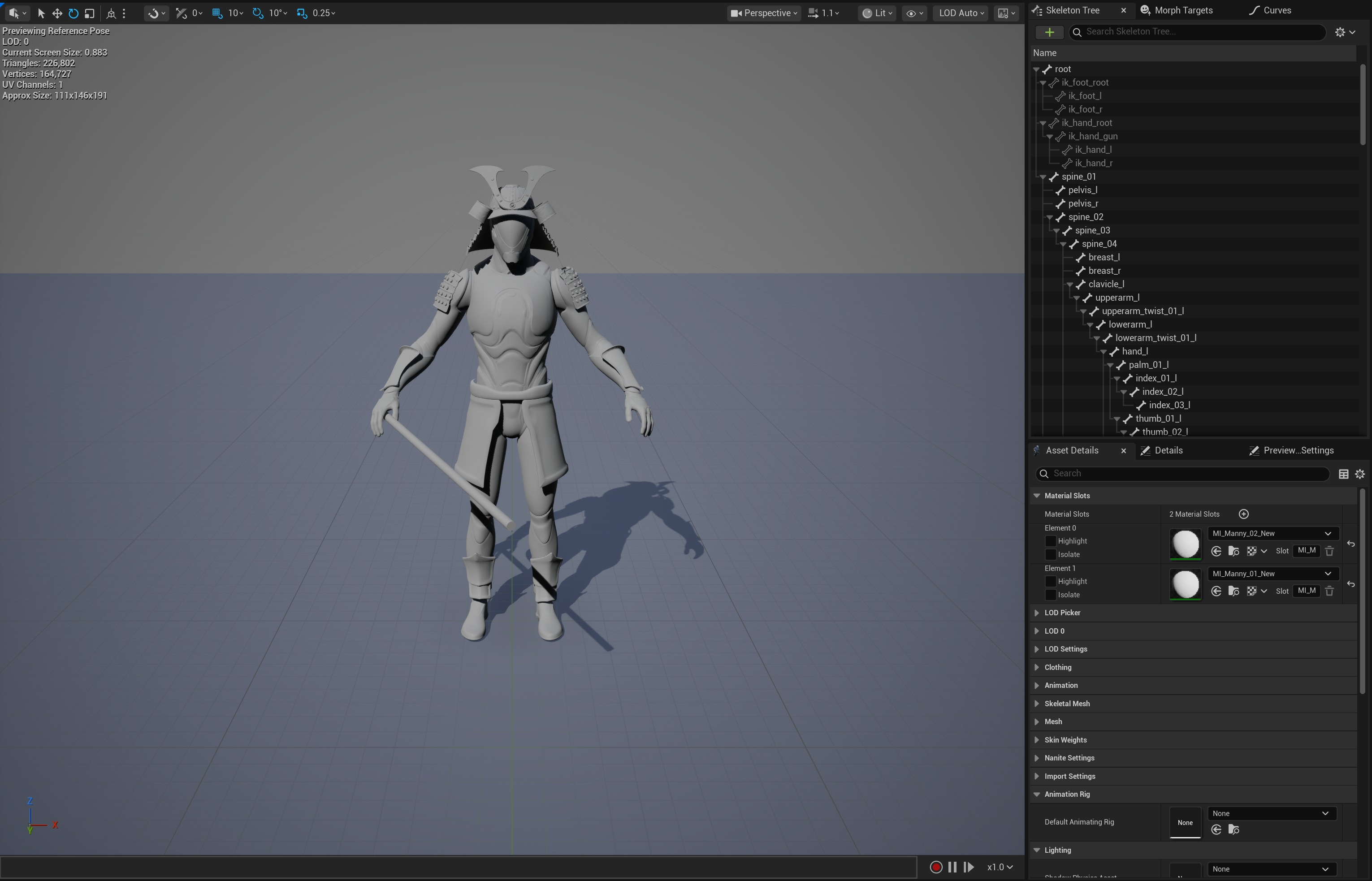
01 · In Unreal
Exported RigBridge character loaded in Unreal Engine 5 skeletal mesh viewer with clean hierarchy
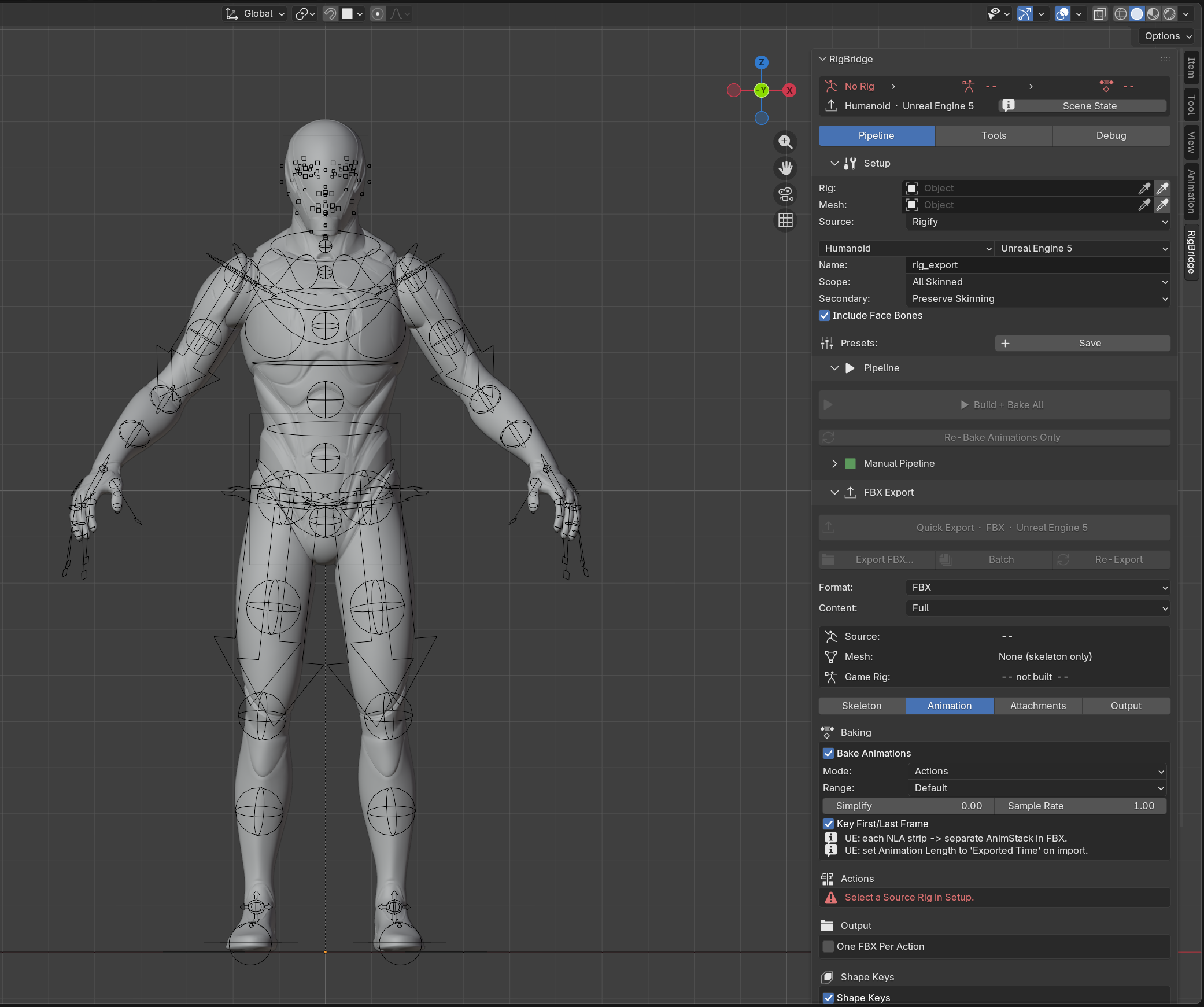
02 · Pipeline & Setup
RigBridge Pipeline tab with Setup fields, Humanoid Unreal Engine 5 profile, and Build + Bake All controls
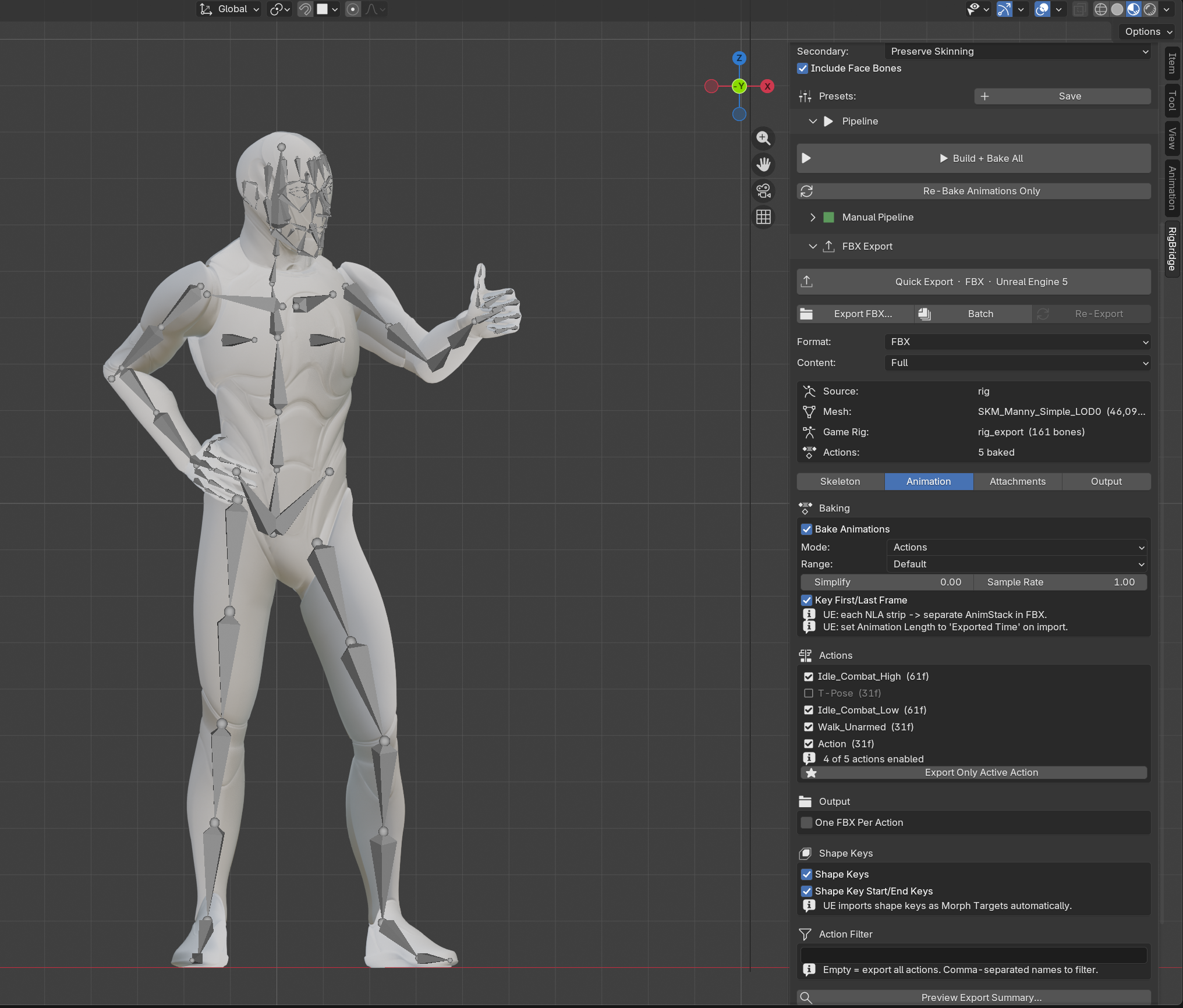
03 · Animation & Baking
RigBridge Animation tab showing baked actions list, bake settings, and shape key options
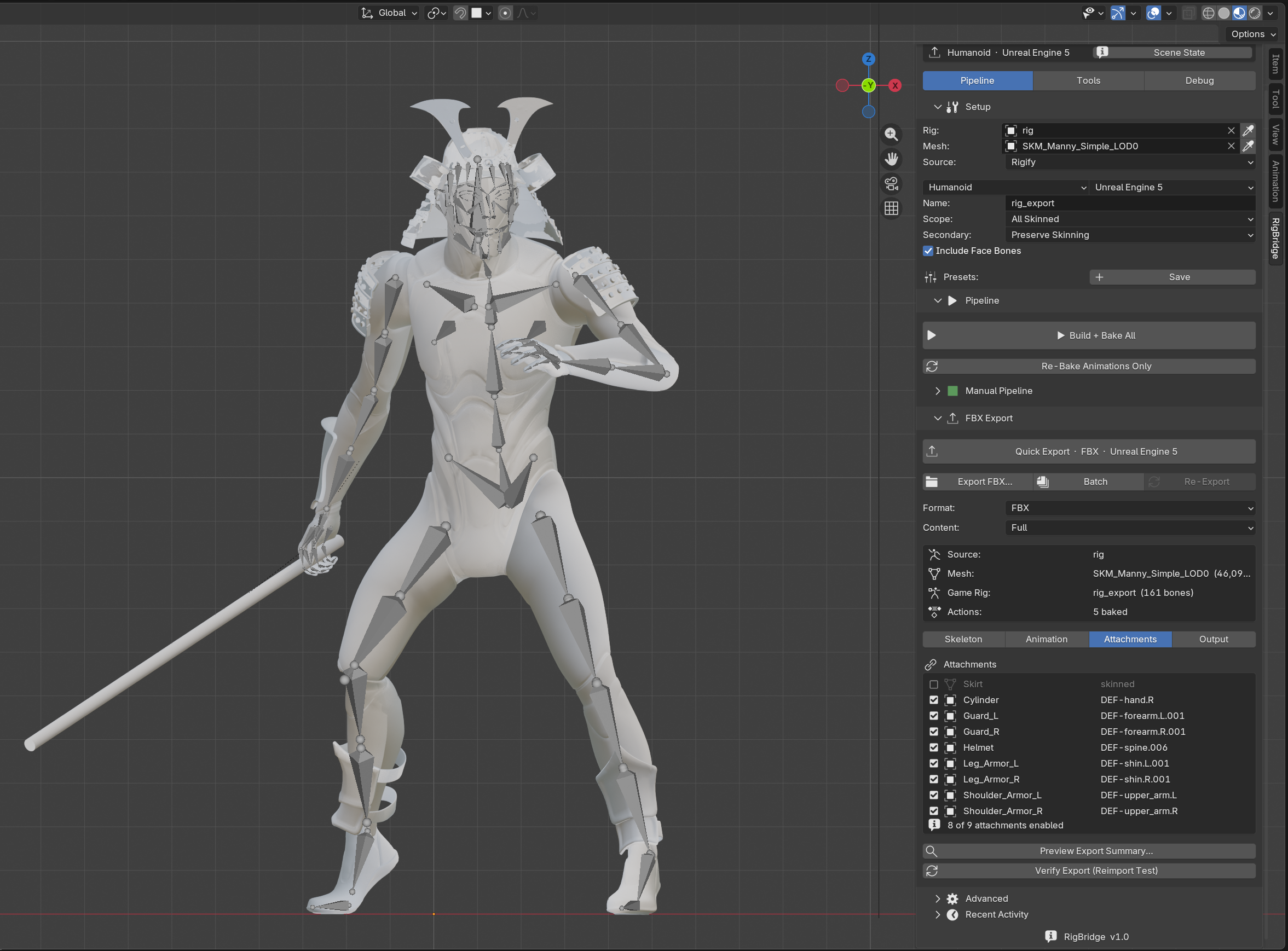
04 · Attachments
Samurai character in RigBridge with Attachments tab listing helmet, guards, shoulder armor, and weapon parented to bones
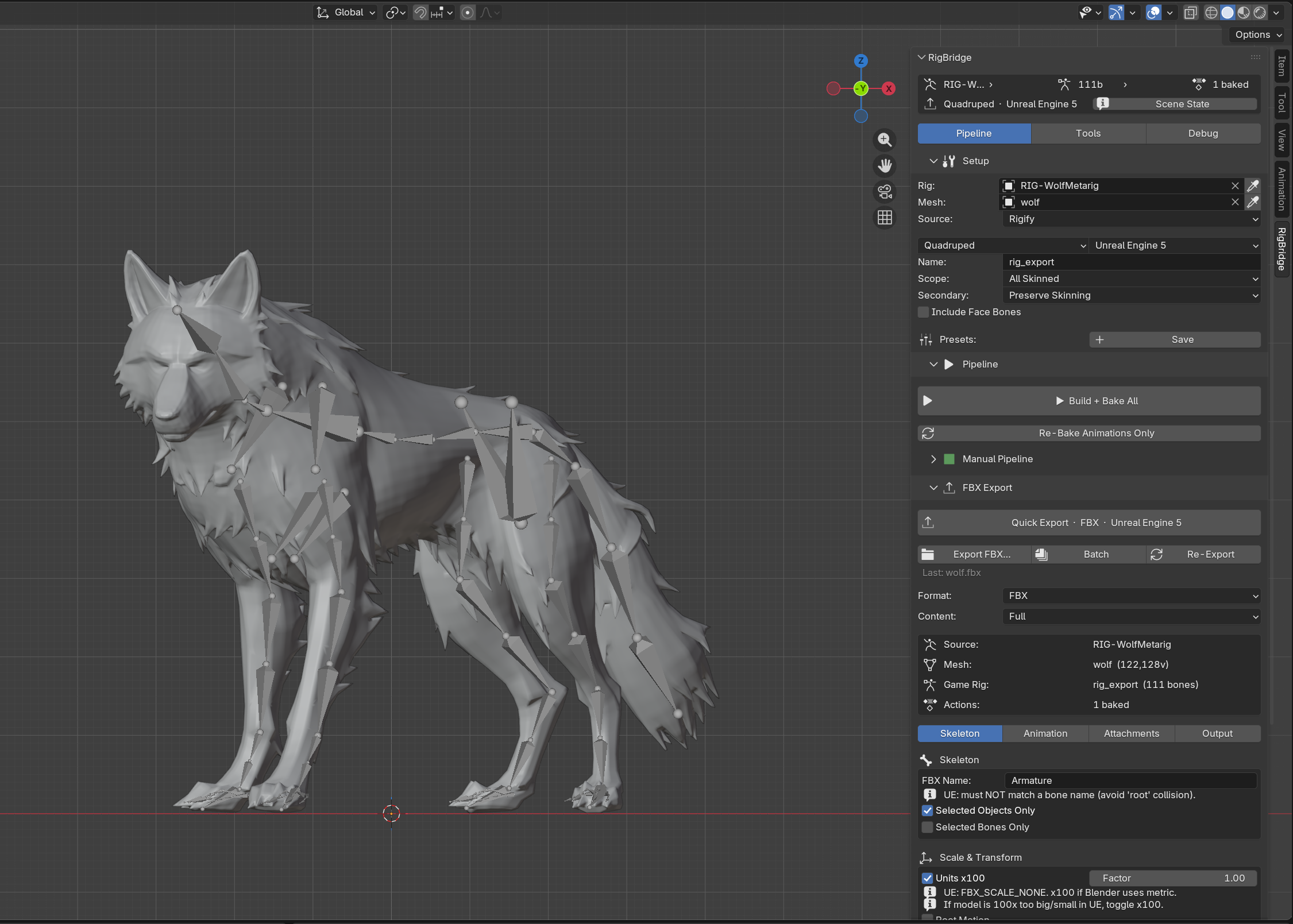
05 · Any Rig
Wolf model with Rigify Quadruped rig exported through RigBridge to Unreal Engine 5
In Unreal
What lands in-engine. Clean skeleton, UE5 bone naming, IK helpers for retargeting, weights intact. No manual fixups after import — this is the payload.
Pipeline
  • One-click Build + Bake All
  • Rigify, Mixamo, and custom rig support (auto-detected)
  • Export rig generated with clean matrices, not duplicated
  • Weighted bone protection
  • Multi-mesh binding at rest pose
  • Action auto-discovery across all .blend data
  • Spine sub-segment detection and merge
  • Pipeline checkpoint with failure reporting
Export
  • Custom forked FBX exporter (6 files, permanent patches)
  • glTF 2.0 (.glb) for Godot and Unity
  • Content modes: Full, Mesh Only, Animation Only, Split
  • Profiles for UE5, UE4, Unity, Godot, Custom
  • Automatic bone naming with collision detection
  • IK bone creation, root motion, shape key export
  • Batch export (one file per action)
  • Attachment toggles for per-export control
The Heatmap
  • Stress test with 21 extreme poses
  • 5 quality maps: stretch, influence, dominance, symmetry, velocity
  • Joint Preview with live heatmap while you paint
  • Hold Pose with next/prev navigation
  • Select Critical Vertices
  • Calibrate thresholds per-pose
  • Non-humanoid auto-pose generation
  • Works on any rig without a game rig
Weight Tools
  • Fix All Joints with auto-revert if worse
  • Generate Base Weights (heat diffusion + twist gradients)
  • Per-vertex optimization from stress scores
  • Joint recipes (apply and save)
  • Normalize, cap influences, strip micro-weights
  • Weight audit with one-click fix
  • Vertex Inspector with weight snapshots
Toolbox
  • 24 diagnostic validators
  • LOD generation with auto-decimation
  • Append Manny or Quinn reference skeletons
  • Setup presets (save and reload configs)
  • Operation log with timestamps
  • Recovery Report after any failure
  • Blender 4.2 – 5.1+ compatible
08 Get it
$49
One-time purchase · All engines · Blender 4.2 – 5.1+
  • Custom FBX exporter with permanent engine-aware fixes
  • One-click pipeline: generate, bind, bake, export
  • Rigify, Mixamo, and custom rig support
  • Stress test with 21 poses and heatmap overlay
  • 5 quality maps and Joint Preview for weight painting
  • 24 diagnostic validators
  • Multi-mesh export with automatic prop discovery
  • glTF support, batch export, LOD generation
  • UE5, UE4, Unity, Godot, and custom engine profiles
Buy RigBridge — $49

Direct support from me. Updates included. I'll fix any issue that gets reported.

Superhive Buy →
Gumroad Buy →
09 About
Kajin

I started working in Blender in 2023. I never really had anything to show for it. I created some small stuff early but never anything I could truly showcase. My goal was to make a video fully in Blender. The project ended up too big in scope and I worked on it on and off for a couple of years, with long breaks in between (which I will hopefully finish in the future... lol). I always enjoyed creating stuff, and gaming has been my main hobby since I was a kid.

Eventually I started building a game. It's a roguelike action RPG built in UE5 with C++ from scratch. Run-based, seed-locked, multiple maps. The combat is hard. Enemies don't scale to you, ever. A knight that killed you on your first run will always be that strong. You just learn what to avoid and what you can take on. The world also remembers everything you do. If you attack a faction, they're going to have a problem with you later. Vendors, NPCs, they all react to how you played. Nothing resets inside a run. It's my first game and it's way too ambitious but honestly that's probably why I'm also the kind of person who would build a whole addon instead of just accepting that the export was broken.

The goal of the tool after was to make it so for my own game dev future I get a fast workflow (if nobody buys it atleast i have a something I'm proud off), instead of the manual option I get a working addon that makes the game rig with the animations and no issues, which effectively saves me time on each character I create for my game. Manually doing all this work would take a lot of time I would love to save, and it's just easier.

Anyways I'm yapping too much. Whatever this addon earns goes directly back into it. I'll fix any issue that gets reported and take time for community requests with promised support. The game I'm creating is the main project I'm working on, however, so supporting this addon supports the game development. I am available for contact at any of my socials.

Currently building

An action RPG.

Currently making a game. Run-based, decisions that compound. Built in UE5 with a custom C++ architecture. Not ready to talk about it but updates will be coming when i have a trailer ready. This is my main project currently. Still very early though. RigBridge exists because this game needed it.

Follow me @Kajin on X for updates on any future projects.

Something else is being built.
REMEMBERED
REMEMBERED
REMEMBERED
REMEMBERED
REMEMBERED
The game RigBridge was built for. In production.